A detailed, practical, and simplified guide for developers who want a clear understanding of MySQL–Spring Boot integration.
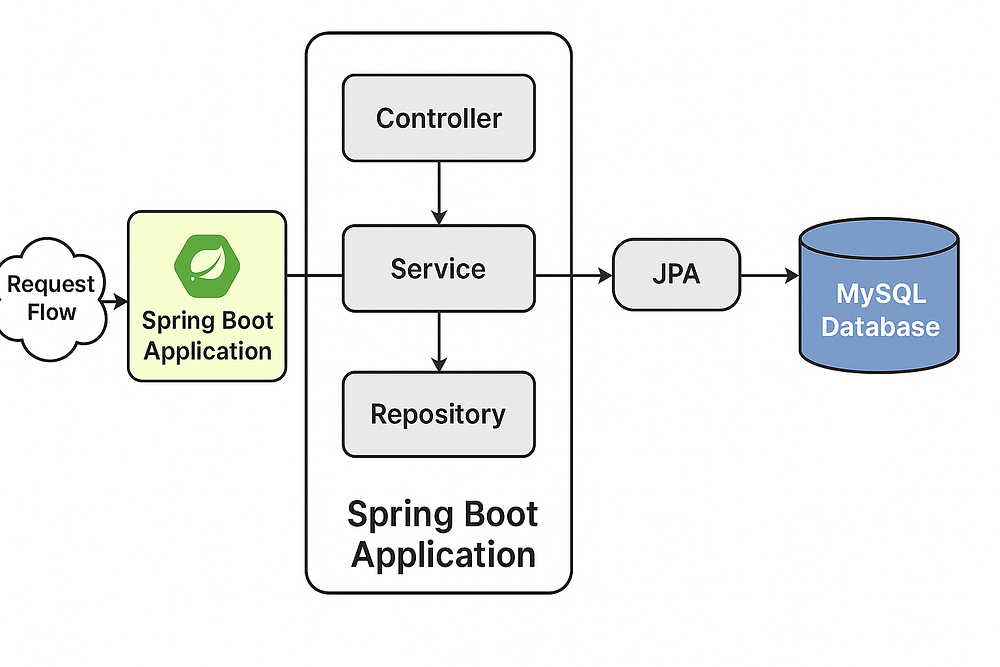
The design adheres to the fundamental principle of Separation of Concerns (SoC) by dividing the application into distinct layers, each with a specific responsibility.
- Request Flow → Spring Boot Application: The request enters the application container.
- Controller→ Service: The Controller handles the web aspect (HTTP, routing, request/response formats) and immediately delegates the core task to the Service layer. This keeps the Controller “light.”
- Service → Repository: The Service layer contains the actual business logic. It determines what needs to be done and then tells the Repository layer how to save or retrieve the data.
- Repository → JPA → MySQL Database: The Repository layer, often implemented using JPA (Java Persistence API) via Spring Data, acts as the data access bridge. It manages the persistence details (like SQL commands) and maps application objects to the Database tables.
Connecting MySQL to a Spring Boot application is one of the most essential skills for any backend or full-stack developer. Whether you’re building a simple CRUD application, a large enterprise project, or a microservice, your app will need a robust and reliable relational database — MySQL fits perfectly for that role.
Many beginners get confused with configuration errors, driver issues, JDBC URL formatting, or entity mapping problems. This guide aims to eliminate those confusions.
Below is a clear, structured, deeply explained guide that walks you from installation → configuration → coding → testing → troubleshooting.
1. Understanding Why Spring Boot and MySQL Are Commonly Used Together
Before jumping into setup, it’s important to understand why these two technologies complement each other so well:
Spring Boot advantages:
- Auto-configuration reduces boilerplate code.
- Built-in support for Spring Data JPA.
- Simplifies dependency handling.
- Production-ready features (metrics, health checks).
- Highly scalable for enterprise applications.
MySQL advantages:
- Lightweight, fast, and free.
- Stores structured relational data.
- Supports indexing, ACID compliance, and transactions.
- Works seamlessly with Hibernate ORM.
Together, Spring Boot + MySQL provide a clean architecture, high productivity, and strong performance, making them one of the most popular backend stacks worldwide.
2. Prerequisites You Must Have Before Starting
Make sure you have:
✔ Java 17+
✔ Maven
✔ Spring Boot (recommended: 3.x)
✔ MySQL Server installed
✔ A database tool like MySQL Workbench / DBeaver
✔ An IDE like IntelliJ IDEA / Eclipse / VS Code
If you are missing any, install them before continuing.
3. Creating the Spring Boot Project (Step-by-Step)
Option 1: Using Spring Initializr
Go to https://start.spring.io
Choose:
Project: Maven
Language: Java
Spring Boot Version: 3.x
Dependencies:
Spring Web
Spring Data JPA
MySQL Driver
Click Generate, then extract and import into IntelliJ/Eclipse.
Option 2: Using IDE (IntelliJ Ultimate)
File → New → Project → Spring Initializr.
4. Adding Dependencies (pom.xml Explained Clearly)
Even if you used Initializr, it’s important to understand what each dependency does.
<dependency>
    <groupId>org.springframework.boot</groupId>
    <artifactId>spring-boot-starter-web</artifactId>
</dependency>
<dependency>
    <groupId>org.springframework.boot</groupId>
    <artifactId>spring-boot-starter-data-jpa</artifactId>
</dependency>
<dependency>
    <groupId>com.mysql</groupId>
    <artifactId>mysql-connector-j</artifactId>
    <scope>runtime</scope>
</dependency>
What they do:
Spring Web → Allows you to create REST APIs
Spring Data JPA → Handles database operations without writing SQL
MySQL Connector-J → Lets Java communicate with MySQL through JDBC
5. Creating the Database in MySQL
Open MySQL Workbench or CLI:
CREATE DATABASE springbootdb;Use any name you like.
6. Configuring Spring Boot to Connect With MySQL
This is the heart of database connectivity.
Go to:
src/main/resources/application.properties
Add:
spring.datasource.url=jdbc:mysql://localhost:3306/springbootdb
spring.datasource.username=root
spring.datasource.password=yourpassword
spring.datasource.driver-class-name=com.mysql.cj.jdbc.Driver
spring.jpa.hibernate.ddl-auto=update
spring.jpa.show-sql=true
spring.jpa.properties.hibernate.dialect=org.hibernate.dialect.MySQL8Dialect
Breaking it down:
spring.datasource.url
Defines the MySQL server address + port + DB name.
spring.jpa.hibernate.ddl-auto=update
Automatically creates/updates tables.
ValueMeaningcreateDrops & recreates tables every timeupdateSafely updates schema without deletingvalidateEnsures schema matches but doesn’t modifynoneNo action
spring.jpa.show-sql=true
Prints SQL queries in console.
7. Creating an Entity (Model Class)
We create a table through an entity.
import jakarta.persistence.*;
@Entity
public class User {
    @Id
    @GeneratedValue(strategy = GenerationType.IDENTITY)
    private Long id;
    private String name;
    private String email;
    // getters and setters
}
What happens when you run the project?
Spring Boot + Hibernate → Creates a table named user automatically.
8. Creating a Repository (Database Interface)
With Spring Data JPA, you never write SQL.
import org.springframework.data.jpa.repository.JpaRepository;

public interface UserRepository extends JpaRepository<User, Long> {
}
This interface gives you ready-made methods:
- save()
- findAll()
- findById()
- deleteById()
9. Creating a Controller to Test the MySQL Connection
import org.springframework.web.bind.annotation.*;
import java.util.List;

@RestController
@RequestMapping("/users")
public class UserController {
    private final UserRepository repository;
    public UserController(UserRepository repository) {
        this.repository = repository;
    }
    @PostMapping
    public User createUser(@RequestBody User user){
        return repository.save(user);
    }
    @GetMapping
    public List<User> getAllUsers(){
        return repository.findAll();
    }
}
10. Running and Testing the Application
Run the application:
mvn spring-boot:runOR click the Run button in your IDE.
Test using Postman:
POST → http://localhost:8080/users
Body:
{
  "name": "John",
  "email": "john@gmail.com"
}
GET → http://localhost:8080/users
If you see results → MySQL is connected successfully.
11. Common Errors and Their Exact Fixes
❌ 1. Communications link failure
✔ MySQL server is not running.
Start MySQL service:
sudo service mysql start❌ 2. Access denied for user ‘root’
Password wrong or permissions missing.
Fix:
ALTER USER 'root'@'localhost' IDENTIFIED BY 'newpassword';❌ 3. Public Key Retrieval Not Allowed
Add:
?allowPublicKeyRetrieval=true&useSSL=falseFinal URL:
jdbc:mysql://localhost:3306/springbootdb?allowPublicKeyRetrieval=true&useSSL=false❌ 4. Unknown database error
Meaning: Database not created.
Run:
CREATE DATABASE springbootdb;12. Best Practices for Production
✔ Use environment variables for DB passwords
✔ Set ddl-auto=none in production
✔ Use connection pool (HikariCP - default)
✔ Use migration tools like Flyway or Liquibase
✔ Never expose database port publicly
✔ Always use MySQL8Dialect for efficient SQL generation
13. Final Summary
To connect Spring Boot to MySQL:
- Install MySQL
- Create DB
- Add dependencies
- Configure application.properties
- Create entity + repository
- Run API
- Test with Postman
- Fix common issues if needed
Spring Boot + MySQL = Clean, powerful, scalable backend stack.




0 Comments